

With more than 60% of Google searches now featuring images or video, sellers must optimise visual content
Google search is becoming increasingly visual. Studio 36 Digital’s recent study on SERP features shows that 50.3% of searches now display image thumbnails and 14.5% feature video carousels, meaning over 60% of results include visual elements. For brands, this shift signals that images and video are no longer optional add-ons, but are central to search visibility.
As visual-first results grow, understanding how to optimise content for carousels, thumbnails, and multi-format SERP features has become critical. Andrew Witts, Digital Marketing Strategist at Studio 36 Digital, explains how businesses can adapt their SEO strategies to capture attention, satisfy search intent, and maintain relevance in visually driven search results.
You can view the full Studio36 Digital study here
What’s driving visual-first search?
The era of the classic 10 blue links is fading. Visual elements now dominate many search results, especially in consumer-focused categories.
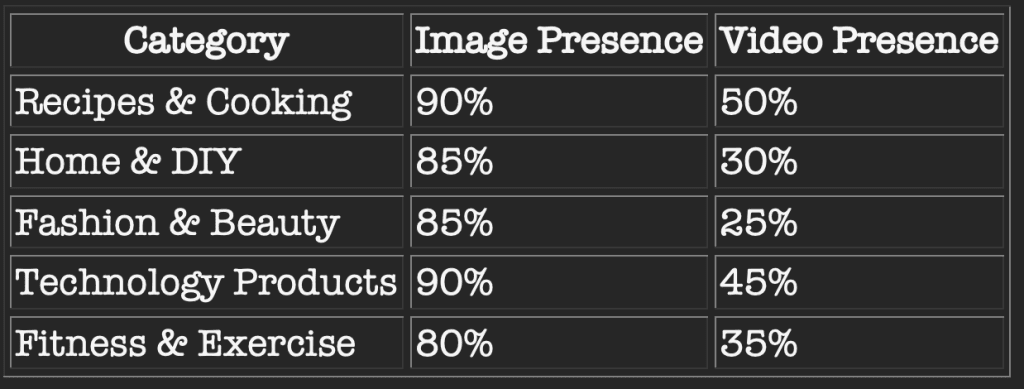

This trend reflects Google’s push towards visual discovery, with features like image packs, video carousels, Google Lens, and multi-modal search increasingly influencing user behaviour.
“Visual content is no longer a supplementary element in SEO; it is becoming a defining factor in search visibility,” says Digital Marketing Expert Andrew Witts from Studio 36. “Our data shows that over 60% of searches now feature images or videos, with categories such as recipes, home DIY, fashion, and technology being especially visual. We predict this could grow to over 70% in 2026. For brands, high-quality images, product galleries, and videos are essential to compete effectively and appear in carousels or thumbnail results.”
According to Watts: “Optimising visuals is not just about adding pretty pictures. Brands need to use descriptive filenames, alt text, and schema markup so search engines understand the content. Videos should be uploaded to YouTube with proper titles, descriptions, and transcripts. Combining text with relevant visuals, infographics, and short clips can create multi-format content that aligns with user intent, increases engagement, and maximises opportunities to appear across multiple SERP features.”
Ultimately, visual-first SEO is about delivering the best experience to users, Watts believes. Content that educates, entertains, or solves problems with clear, informative visuals signals expertise and authority.
“By treating images and videos as integral to optimisation rather than as add-ons, brands can improve visibility and stay ahead in a search landscape that is becoming increasingly visual,” he concludes.
***********************************************
How to optimise for visual SEO
- Descriptive filenames and alt text: Name images and video files using clear, concise, and keyword-relevant descriptions that reflect search intent. Alt text should be informative, contextually relevant, and help visually impaired users, while also providing cues to search engines.
- Structured data and schema markup: Implement Schema.org tags such as ImageObject, VideoObject, and product schema to help Google understand the content type, context, and purpose. This can improve the likelihood of appearing in image packs, video carousels, or rich results.
- Optimised video content: Upload videos to YouTube or other search-friendly platforms, with attention to title, description, tags, and thumbnail selection. Include transcripts and captions to make content accessible, indexable, and understandable by search algorithms.
- Multi-format, user-focused content: Combine text with images, infographics, and short video clips that directly answer search queries. For example, a “how-to” guide could include step-by-step images and a quick explainer video. Multi-format content increases opportunities to appear in multiple SERP features for the same query.
- Page speed and mobile optimisation: Ensure visuals are optimised for fast loading without compromising quality. Use modern formats (like WebP) and lazy-loading to reduce page weight. Mobile-friendly layouts are critical as many users access content via smartphones or tablets.
- Content relevance and quality: High-quality visuals should align with the topic and search intent, providing clear answers, demonstrating expertise, and supporting trustworthiness. Stock or generic imagery will not perform as well as original, informative, or tutorial-based visuals.
- Internal linking and image placement: Integrate visuals logically within content, using captions, headings, and internal links to related pages. This provides context to search engines and enhances the user experience.
- Monitor performance and iterate: Track how images and videos perform in search results using tools like Google Search Console and YouTube Analytics. Adjust formats, content placement, and optimisation techniques based on CTR, impressions, and engagement trends.
***********************************************